

As far as WCM has come over the past few years, one of the capabilities that is still constantly requested and missing is the ability to easily add commenting on a content item. We have a specific use case with a customer I’m working with now, only taking comments to the next level in that they’re looking for comments posted on a WCM content item to also be posted to a user’s social feed (i.e. Activity Stream). The latest Social Rendering Templates (here) now provide CRUD capabilities, allowing users to not only consume social content, but also be able to engage with the social content. One of the sample templates provided is for Forums / Topics, and the templates allow you to read, post / reply, delete and like forum topics and replies, which includes nested topic replies. While playing around with the Forums / Topics template, I thought it would be a perfect fit for being able to extend this functionality to web content, which by the nature of it also being social content, would then be embedded into a user’s social feed.
The next step was figuring out how to make Forum / Topics specific to web content items so that the appropriate Forum Topic was shown based on the selected web content item. Digging into the social rendering templates, I found how the List Rendering (i.e. part of the DDC framework) capability worked, so figured I could create a Forum for all WCM comments, and then there could be an associated Forum Topic for each content item in which a WCM content author wanted to allow comments for. As a starting point, I took the Forums / Topics social rendering template example as a starting point and embedded it into a content item’s presentation template. I then manually overrode the topic id so that it would show a forum topic specific to that id. The next thing to do was to add a couple of fields to the authoring template for content type’s in which you’re looking to allow content. In my example, I added two fields / elements, one is a checkbox that allows content authors to choose whether they want to allow comments for a content item, and the second is a simple text field that holds the topic ID (it would be hidden from the content author). I also had to create a custom workflow action which programatically created the forum topic when a content item was published and then set the topic id on the content item, which then in turn would be used within the presentation template as described above to add the comments to the content item.
Here’s a summary of the necessary steps to get this to work: (at a high level)
- Manually create a Forum in Connections for WCM Comments
- Add the necessary elements (i.e. Add Comments?, Topic ID) to the WCM authoring template(s) of the content items in which you’re looking to add comments.
- Embed the Forums / Topics social rendering capabilities into the associated content’s presentation template(s).
- Create a custom WCM workflow action that programatically creates a Forum Topic (within the manually created WCM comments forum) when a content item is published. The workflow also updates the content item with the topic / comment ID given the result from the programmatic creation of the Forum Topic. I also added some logic to create a link to the WCM content item within the initial topic entry.
Here are some screen shots of the results:
| Authoring Template Elements | Screenshot Shot of Social Commenting | Screenshot of Comments in Social Feed |
|---|---|---|
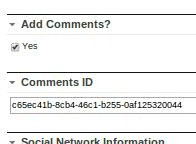 |
 |
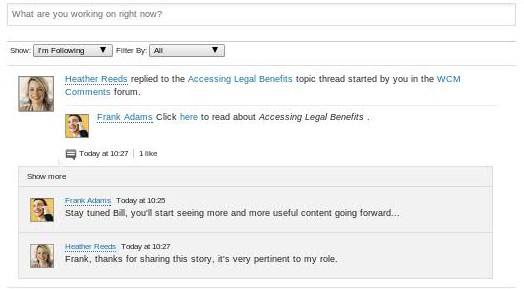 |
I have working code, deployable as a PAA in which I’d be happy to share, let me know if you have any questions or would like to discuss this asset further…
 Kristopher S. Barry