WebSphere Portal v8.x Theme Profiles and Modules

A lot of work has been done to the theme architecture in the latest versions of WebSphere Portal. One of the nice things built into the theme architecture is being able to change the profile for each Portal page, the profile being made of web resources, such as HTML, CSS and JavaScript files and libraries. This allows you to load only the necessary resources on a page-by-page basis. The profile is made up of one to many modules, the modules containing the various web-based resources (i.e. HTML, CSS, JavaScript). An example of a module would be jQuery, meaning, if the jQuery module is added to a profile, any page that uses a profile containing the jQuery module would pre-load the jQuery resources that make up that module, in turn, allowing any portlets on that page to use the jQuery resource (i.e. libraries) as well. Another example of a module would be the Content Template Catalog (CTC) module, which loads all of the web resources libraries required by CTC.

In a prior blog post (here), I discussed a way to show / hide the Edit Mode link contained within the theme. In v8.5, the Edit Mode link is replaced by the new Site Toolbar (click here to read more about the Site Toolbar). The Site Toolbar is another example of a module that is placed in all of the v8.5 profiles, so to remove the Site Toolbar, it would be as easy as removing the Site Toolbar module from any of the profiles associated with Portal pages in which you don’t want the Site Toolbar to be displayed.

Click here to learn more about Developing Themes for WebSphere Portal v8.5.

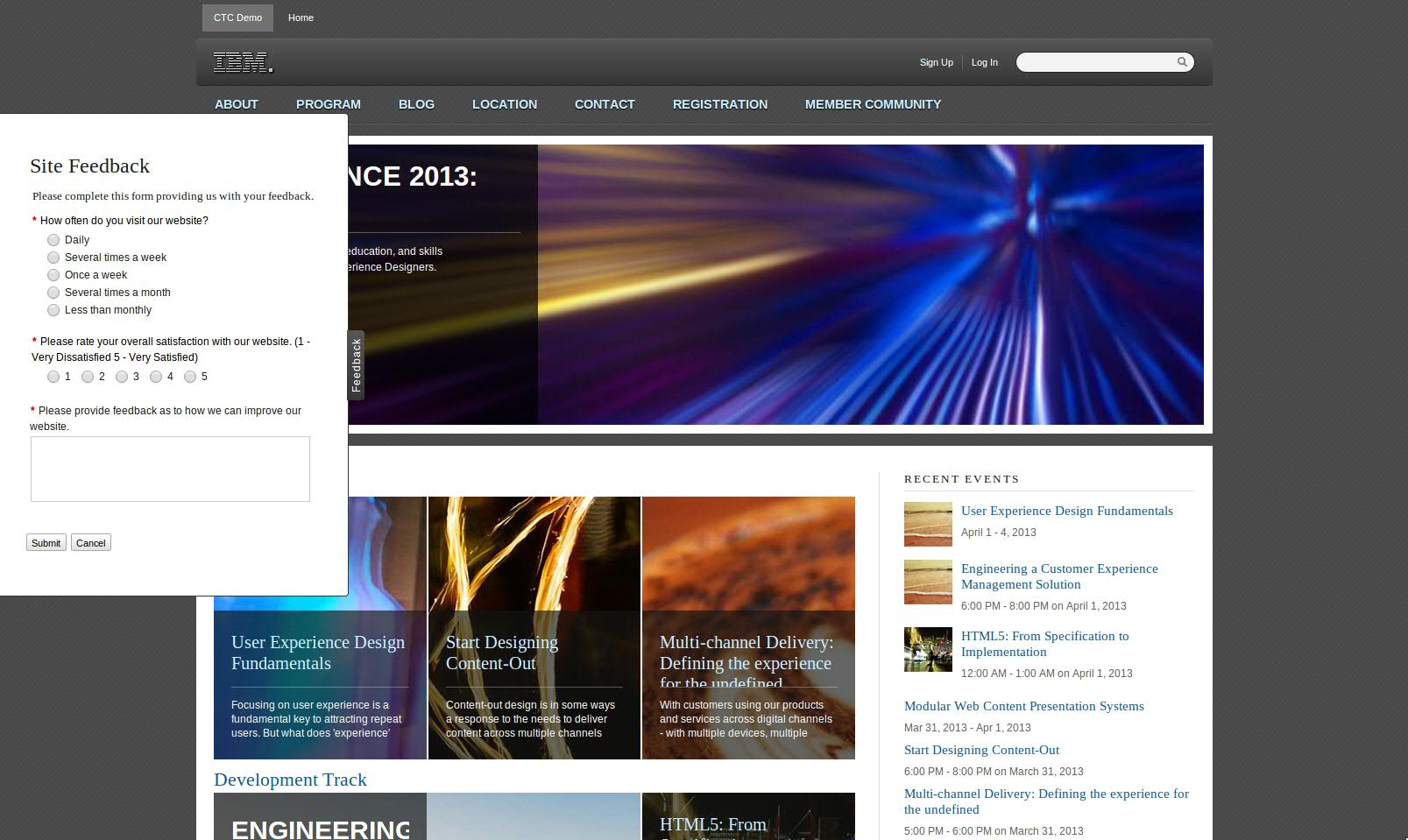
WebSphere Portal Feedback Form using Forms Experience Builder

I created a demo asset of a feedback widget that is embedded in the out-of-the-box WebSphere Portal v8.x theme and presented on every Portal page. This widget can easily be embedded in any theme, for sharing purposes, I created it using the out-of-the-box theme, though the code can very easily be copied and pasted into any theme’s file. For simplicity, I was not concerned about placing any JavaScript or CSS in associated file rather I used all inline JS, CSS and HTML. If this were to be done in an actual WebSphere Portal application, a better thought would be to create a dynamic content spot with the widget code. Anyway, feek free to reach out for the asset I developed for this, it simply consists of a theme_en.html file and associated form .nitro_s file if you wish to install it. Here are a couple of screen shots as well:

Cookie-based Content Personalization within WebSphere Portal and IBM Web Content Manager

I’ve worked on numerous demos recently in which a use case was required to display personalization-based capabilities outside the context or need of an authenticated user.  I’ve typically been demoing and talking to this capability by having a set of checkboxes on a page that are rendered via a WCM taxonomy component that maps to a WCM taxonomy and categories in which the content to be personalized can also be associated with.  I’ve also created a custom application object (i.e. using Rational Application Developer) following the Personalization APIs that does the content filtering given the selected taxonomy categor(ies).  To do this, I’ve also written JavaScript which takes the selected taxonomy categor(ies) and puts them in an HTTP cookie and are then accessible to the Personalization application object, which returns the selected values to the PZN engine. This customization also uses AJAX to retrieve the personalized WCM content when a checkbox is clicked so that a page refresh is not required. I’ve provided some screen shots below of a recent customized demo I’ve done recently including this logic:

Customized Personalization:
(before selection)
Customized Personalization:
(after selection)
PZN-customization-before PZN-customization-after
Please feel free to reach out if you have any interest in setting up similar logic or you would like to see any of the code used, there’s quite a bit of it between the WCM components (i.e. HTML, Personalization, Taxonomy, etc.), JavaScript and Personalization Application Objects…